Using Core Data in a Static Library
Lets get started by creating a static library as shown below

Lets name the Library as “BNRCredentialDepot”.
Since core data uses managed object model (momd) and sqlite to persist the data, moms should be bundled in the library. In order to achieve this, we have to create a bundle and include momd in the bundle.
Add a new DataModel file and create entities and attributes


We need to embed this data model in a bundle file so that we can package this along with the library.
Add a new target and create a bundle “CredentialDepot”, change the base SDK to Latest iOS SDK as shown below
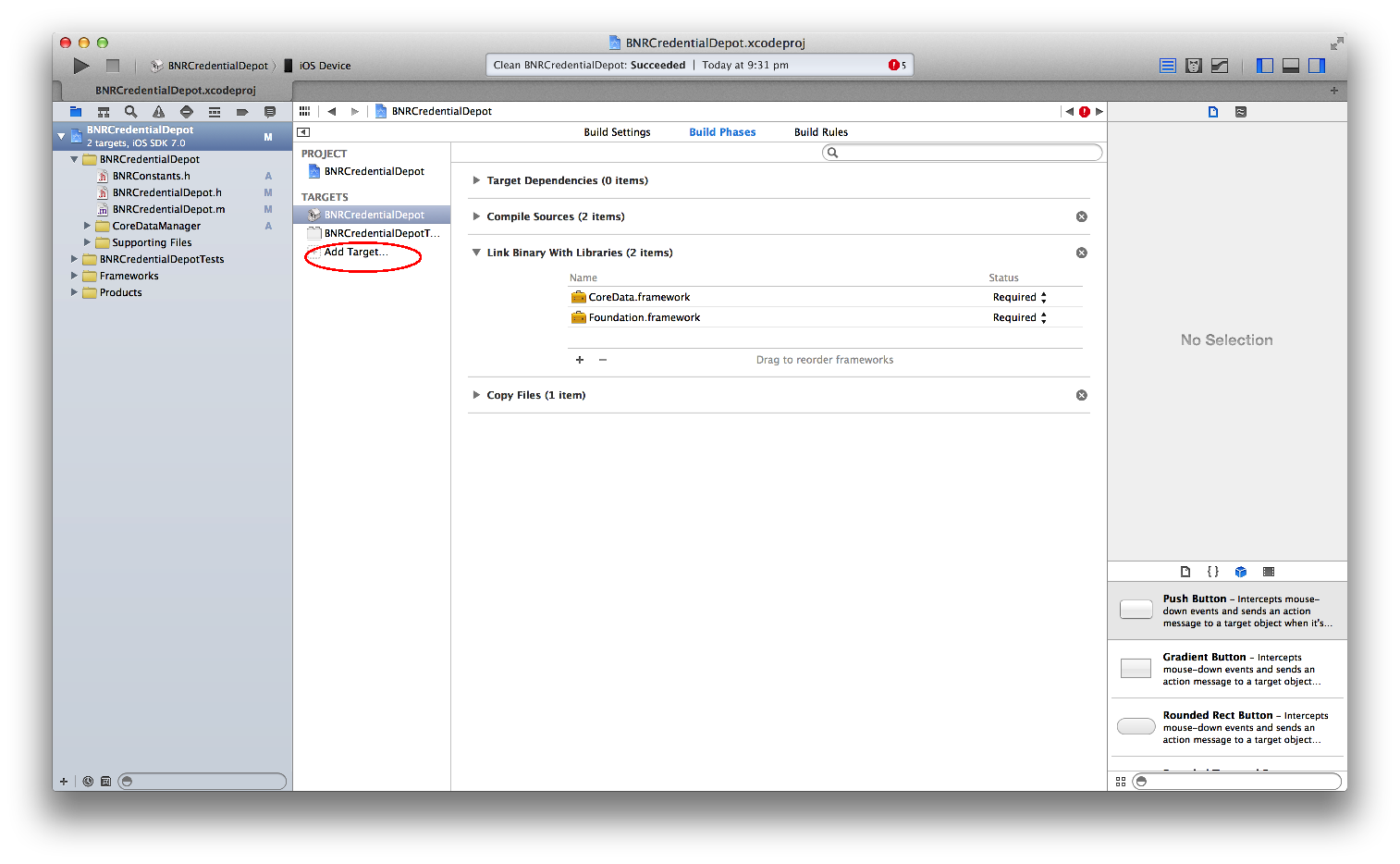


Now drag and drop Credentials.xcdatamodeld to CredentialDepot -> Build Phases ->Compile Sources as shown below


Expand the Other Frameworks folder in the left pane and delete the duplicate frameworks – Foundation.framework, AppKit.framework. Add CoreData.framework in the build phase

Now, add a new file of type NSObject class and create managed object context, managed object model & persistent store coordinator as shown below
NSFetchRequest *fetchRequest = [[NSFetchRequest alloc] init];NSEntityDescription *entity = [NSEntityDescription entityForName:@"UserCredentials"inManagedObjectContext:context];[fetchRequest setEntity:entity];NSArray *fetchedObjects = [context executeFetchRequest:fetchRequest error:&error];if ([fetchedObjects count]) {UserCredentials *userCredentials = [fetchedObjects objectAtIndex:0];@try{//Store Username & Password in the DBuserCredentials.username = [userCredentialsDict objectForKey:USERNAME];userCredentials.password = [userCredentialsDict objectForKey:PASSWORD];NSLog(LIBRARY_LOGS_BEGIN);if (![context save:&error]) {NSLog(@"Error in saving User Credentials: %@", [error localizedDescription]);}else{//If the credentials are already preset, update the recordisSuccess =YES;NSLog(@"Update User Credentials in DB : Username - %@ , Password - %@",userCredentials.username,userCredentials.password);}NSLog(LIBRARY_LOGS_END);}@catch (NSException *exception) {//Log exceptionNSLog(LIBRARY_LOGS_BEGIN);NSLog(@"Exception - %@",exception.description);NSLog(LIBRARY_LOGS_END);}}else{UserCredentials *userCredentials = [NSEntityDescription insertNewObjectForEntityForName:@"UserCredentials" inManagedObjectContext:context];@try{//Store Username & Password in the DBuserCredentials.username = [userCredentialsDict objectForKey:USERNAME];userCredentials.password = [userCredentialsDict objectForKey:PASSWORD];NSLog(LIBRARY_LOGS_BEGIN);if (![context save:&error]) {NSLog(@"Error in saving User Credentials: %@", [error localizedDescription]);}else{//If the credentials are not preset, insert the recordisSuccess =YES;NSLog(@"Insert User Credentials in DB : Username - %@ , Password - %@",userCredentials.username,userCredentials.password);}NSLog(LIBRARY_LOGS_END);}@catch (NSException *exception) {//Log exceptionNSLog(LIBRARY_LOGS_BEGIN);NSLog(@"Exception - %@",exception.description);NSLog(LIBRARY_LOGS_END);}} return isSuccess;} |
With our logic to fetch and store the user credentials is written, we have to link the target of the bundle with the application.
Go to Product -> Scheme -> Edit Scheme
Select Build & then select CredentialsDepot , click Add as shown below


Add this code in BNRCredentialDepot class
1
2
3
4
5
6
7
8
9
| +(NSMutableDictionary *)getUserCredentials{BNRCredentialManager *credentialManager = [[BNRCredentialManager alloc] init];return [credentialManager getUserCredentialsFromDB];} |
1
2
3
4
5
6
7
8
9
| +(BOOL)storeUserCredentials:(NSMutableDictionary *)userCredentialsDict{BNRCredentialManager *credentialManager = [[BNRCredentialManager alloc] init];return [credentialManager storeUserCredentialsFromDB:userCredentialsDict];} |
Now, its time to build the library ! Use CMD+B to build the library. It should build without any errors.

Make sure both .a and .bundle files are generated with any errors !
Now, open our CredentialManager application and add libBNRCredentialDepot.a , CredentialsDepot.bundle & BNRCredentialDepot.h in CredentialManager.
All you need to do is call these methods on click of Register & Login buttons respectively !
1
2
3
4
5
6
7
8
9
10
11
12
| </pre>-(BOOL)isRegistrationSuccess{NSMutableDictionary *userDict = [[NSMutableDictionary alloc] initWithObjectsAndKeys:self.usernameTextFieldForRegistration.text,USERNAME,self.passwordTextFieldForRegistration.text,PASSWORD, nil];BOOL isSuccess= [BNRCredentialDepot storeUserCredentials:userDict];return isSuccess;} |
1
2
3
4
5
6
7
8
9
10
11
12
13
14
15
16
17
18
19
| <pre>-(BOOL)isLoginSuccess{BOOL isSuccess = NO;NSMutableDictionary *userDict = [BNRCredentialDepot getUserCredentials];if ([[userDict objectForKey:USERNAME] isEqualToString:self.usernameTextFieldForLogin.text] && [[userDict objectForKey:PASSWORD] isEqualToString:self.passwordTextFieldForLogin.text]) {isSuccess = YES;return isSuccess;}return isSuccess;} |
