CoreData in Swift5, (Save, Read, Delete, Update, MergeConflicts) and Add CoreData for existing project
Core Datais an object graph and persistence framework provided by Apple in the macOS and iOS operating systems.
SQLite:
Have Data Constrains feature.
Operates on data, stored on disk.
Can Drop table and Edit data without loading them in memory.
Slow as compared to core data.
Core Data:
Don’t have Data Constraints,if required need to implement by business logic.
Operates on in memory.(data needs to be loaded from disk to memory)
Need to load entire data if we need to drop table or update.
Fast in terms of record creation.(saving them may be time consuming)
For existing project, we can easily add CoreData by following below steps
First copy below code in AppDelegate.swift
we need to copy everything from applicationWillTerminate()to the end of the file:
func applicationWillTerminate(_ application: UIApplication) {
// Called when the application is about to terminate. Save data if appropriate. See also applicationDidEnterBackground:. // Saves changes in the application's managed object context before the application terminates. self.saveContext()
}
// MARK: - Core Data stack
lazy var persistentContainer: NSPersistentContainer = {
/*
The persistent container for the application. This implementation
creates and returns a container, having loaded the store for the
application to it. This property is optional since there are legitimate
error conditions that could cause the creation of the store to fail.
*/
let container = NSPersistentContainer(name: "your-data-model-file")
container.loadPersistentStores(completionHandler: { (storeDescription, error) in
if let error = error as NSError? {
// Replace this implementation with code to handle the error appropriately.// fatalError() causes the application to generate a crash log and terminate. You should not use this function in a shipping application, although it may be useful during development./*
Typical reasons for an error here include:
* The parent directory does not exist, cannot be created, or disallows writing.
* The persistent store is not accessible, due to permissions or data protection when the device is locked.
* The device is out of space.
* The store could not be migrated to the current model version.
Check the error message to determine what the actual problem was.
*/
fatalError("Unresolved error \(error), \(error.userInfo)")
}
})
return container
}()
// MARK: - Core Data Saving support
func saveContext () {
let context = persistentContainer.viewContext
if context.hasChanges {
do {
try context.save()
} catch {
// Replace this implementation with code to handle the error appropriately.// fatalError() causes the application to generate a crash log and terminate. You should not use this function in a shipping application, although it may be useful during development.
let nserror = error as NSError
fatalError("Unresolved error \(nserror), \(nserror.userInfo)")
}
}
}
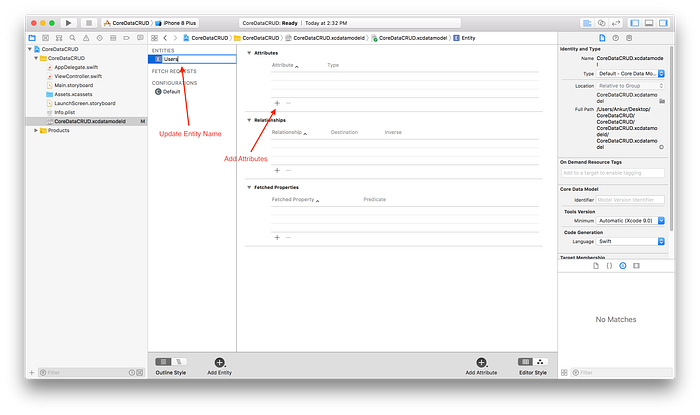
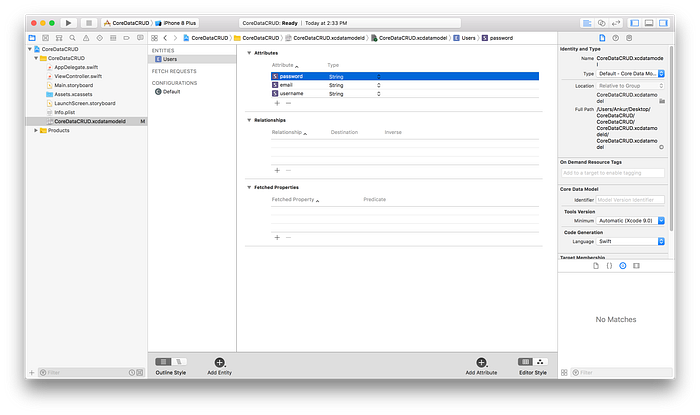
Configure Entity Name and Attributes
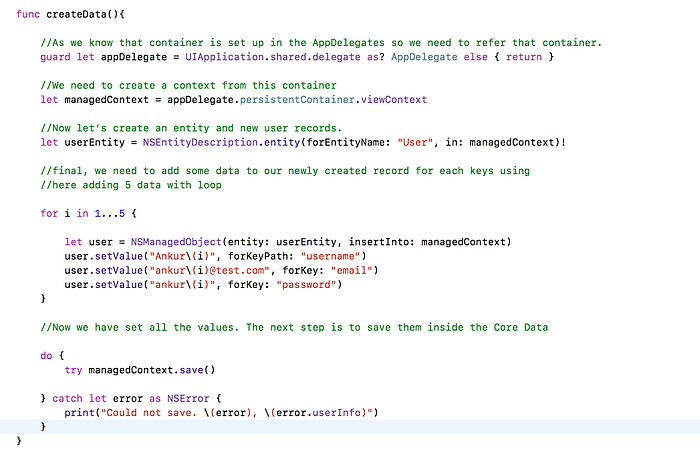
Create or Save Records to Core Data
The process of adding the records to Core Data has following tasks
Refer to persistentContainer from appdelegate
Create the context from persistentContainer
Create an entity with User
Create new record with this User Entity
Set values for the records for each key
When saving data, we can make the attributes as uniques for not repeating save values.
There's a new section in the sidebar when selecting an entity in the editor for Core Data. You can set what constraint(s) you want to be unique across all instances of an entity
For automatic conflict resolution during saves, you'll need to make sure you've got a merge policy set for your managed object context or else you'll just get errors when saving (which might actually be what you want)




No comments:
Post a Comment